
Description
Track for WooCommerce Google Analytics 4 (GA4), Meta Pixel (Facebook pixel), Google Ads, TikTok & more via Google Tag Manager (GTM).
Product Description
Conversios is a dynamic WooCommerce plugin, designed to streamline digital marketing and analytics. Integrating Google Analytics 4 (GA4) and various ad channel pixels through Google Tag Manager, it also offers advanced product feed management. Conversios is the go-to solution for enhancing e-commerce strategies, optimizing ad placements, and boosting sales and conversion rates.
The plugin simplifies ecommerce and conversion tracking, and audience building. With GA4 integration, it facilitates informed decision-making for improved conversions. Conversios supports Meta Pixel, Google Ads, TikTok Pixel, and more, enabling dynamic audience targeting and campaign monitoring. Its user-friendly Google Tag Manager interface requires no coding, focusing on GA4, Meta Pixel, and Google Tag Manager functionalities.
Conversios also features cutting-edge server-side tracking, enhancing data collection accuracy by bypassing blockers like ad blockers. This feature is crucial for tools like GA4 and Meta Pixel, providing reliable tracking and optimizing store performance.
Moreover, Conversios provides comprehensive ecommerce reporting and AI-generated insights. Its ecommerce reports offer essential KPIs and analytics, with smart email delivery and AI insights enabling strategic decision-making. This facilitates understanding audience trends and improving sales decisions.
Finally, Conversios includes a Product Feed Manager for WooCommerce. Essential for Google Merchant Center, Facebook Catalog, and TikTok Catalog, it ensures up-to-date product feeds for advertising campaigns. The plugin supports automated updates and advanced product catalog management, increasing visibility and advertising effectiveness.
Google Analytics 4 Ecommerce Tracking via Google Tag Manager
Conversion Tracking and Dynamic Audience Building with Multi-Platform Pixel Integrations (Google Ads Pixel, Meta (Facebook + Instagram) Pixel, Snapchat Pixel, Pinterest Pixel, Tiktok Pixel, Microsoft Ads Pixel, and Twitter Pixel)
Leveraging Google Analytics 4 through Google Tag Manager, our approach encompasses comprehensive e-commerce tracking with easy setup. We seamlessly integrate a suite of pixels, including Google Ads, Meta (Facebook and Instagram), Snapchat, Pinterest, TikTok, Microsoft Ads, and Twitter, enhancing our capability to build dynamic audiences and accurately track conversions. This multi-platform pixel integration is pivotal in offering a holistic view of customer interactions, driving more effective marketing strategies and business growth.
Effortless Integration and Streamlined Tracking with Data Accuracy:
- Supercharge your WooCommerce store with seamless integration for: Google Analytics 4, Google Tag Manager, Google Ads, Meta Pixel (Facebook Ads), Snapchat Pixel, Pinterest Pixel, TikTok Pixel, Microsoft Ads Pixel, and Twitter Pixel.
• Includes seamless integration for Google Analytics 4, Google Tag Manager, Google Ads, Meta Pixel, Snapchat Pixel, Pinterest Pixel, TikTok Pixel, Microsoft Ads Pixel, and Twitter Pixel.
• Automates Google Tag Manager with 100+ Tags, Triggers & Variables in a single click.
• One-click setup eliminates manual coding and configuration.
• Google Tag Manager-based implementation for faster page load.
• Integration and automation of Google Tag Manager account for full control and faster page speed.
• Quick and easy installation with no code or expertise required.
• Accurate page and e-commerce event tracking for insightful reporting.
Google Analytics 4 E-commerce Tracking Overview
• Page_view: Tracks all web pages.
• Purchase: Tracks the purchase event when an order is placed.
• View_item_list: Tracks when a user views products on any product listing page.
• Select_item: Tracks when a user selects/clicks on a specific product.
• Add_to_cart: Tracks when a product is added to the cart.
• Remove_from_cart: Tracks when a product is removed from the cart.
• View_cart: Tracks when a user views the cart page.
• Begin_checkout: Tracks when a user initiates checkout.
• Add_payment_info: Tracks when a user selects a payment method.
• Add_shipping_info: Tracks when a user selects a shipping method.
Boost Campaign Performance and Personalize Customer Journeys:
Seamless integration with Google Ads, Meta Pixel (Facebook Ads), Snapchat Pixel, Pinterest Pixel, TikTok Pixel, Microsoft Ads Pixel, and Twitter Pixel: Streamline your advertising efforts with unified conversion tracking across platforms.
Google Ads Tracking Overview
• Conversion tracking for purchase events.
• Conversion tracking for add-to-cart events.
• Conversion tracking for begin checkout events.
• Enhanced conversion tracking for add-to-cart events.
• Dynamic audience building based on user browsing behavior.
• Five audience list creation in Google Ads.
Facebook Ads Tracking Overview
• Conversion tracking for purchase events.
• Dynamic remarketing audience building based on user browsing behavior.
• Advanced Matching feature for improved event quality score.
• Server-side tracking for Meta (Facebook) events.
Setting Up FB Pixel and FBCAPI with Conversios Plugin:
Setup Guide
TikTok Ads Tracking Overview
• Conversion tracking for purchase events.
• Dynamic audience building based on user browsing behavior.
• Advanced Matching feature for improved event quality score.
• TikTok Events API for server-side tracking of e-commerce events.
Setting Up TikTok Pixel with Conversios Plugin:
Setup Guide
Snapchat Ads Tracking Overview
• Conversion tracking for purchase events.
• Audience building based on e-commerce events.
• Snapchat Conversions API for server-side tracking of e-commerce events.
Setting Up Snapchat Pixel with Conversios Plugin:
Setup Guide
Pinterest Ads Tracking Overview
• Conversion tracking for purchase events.
• Dynamic remarketing audience building based on user browsing behavior.
Setting Up Pinterest Pixel with Conversios Plugin:
Setup Guide
Microsoft Ads Tracking Overview
• Conversion tracking for purchase events.
• Dynamic remarketing audience building based on user browsing behavior.
Setting Up Microsoft Ads Pixel with Conversios Plugin:
Setup Guide
Other Ads Integration
* Microsoft Clarity Integration
* Hotjar Integration
* Crazy Egg Integration
* Twitter Ads Tracking
Setting Up Twitter Pixel with Conversios Plugin:
Setup Guide
Setting Up Hotjar Pixel with Conversios Plugin:
Setup Guide
Google Ads Campaign Optimization
• Use Google Analytics 4 data for data-driven decisions.
• Track conversions across platforms for improvement.
• Personalize shopping experience using user behavior data.
Enhanced Ecommerce Reporting and AI-Powered Insights:
E-commerce Tracking and Reporting in WordPress
• Manages tracking and reporting from one central location.
• Provides Google Analytics 4 dashboards for easy access to metrics.
• Offers AI-powered insights on Google Analytics and Google Ads data.
• Schedule reports in your email inbox daily.
• Automates data collection and reporting for efficient decision-making.
• Enhances customer experience by providing insights into user behavior.
• Reduces complexity and increases efficiency by automating data collection and reporting.
Server Side Tracking for Google Analytics 4, Google Ads, Meta (Facebook + Instagram), Tiktok and Snapchat for Enhanced Accuracy and Privacy
Server-side Tagging Overview
• Tracks user interactions and conversions on various platforms including Google Analytics 4, Facebook, Google Ads, Snapchat Conversions API, and TikTok Events API.
• Enhances data accuracy, privacy, and performance through automation of server GTM (Google Tag Manager) and web GTM (Google Tag Manager).
• Provides Google Cloud hosting for sGTM (Google Tag Manager) for 100% uptime, scalability, and security.
• Eliminates manual coding with server ecommerce data layer automation and customer loader.
• Offers unlimited hits on the server.
• Provides comprehensive tracking and audience building for Google Analytics 4, Google Ads, Meta (Facebook) Pixel, Facebook CAPI, Snapchat Pixel, and TikTok Pixel and TikTok Events API.
Automate & Optimize Feeds for Google Shopping Feed, TikTok Catalog Feed, and Meta (Facebook) Catalog Feed.
Supercharge your WooCommerce sales with a one-stop platform for streamlined product feed management. Say goodbye to manual data entry and hello to effortless syncs with leading ad platforms like Google Shopping Catalog Feed, TikTok Catalog Feed, and Meta (Facebook) Catalog Feed.
-
Effortless Feed Creation:
- Automated Syncs: Set it and forget it! Schedule automatic product updates for Google Shopping Feed, Meta (Facebook) Catalog Feed, and TikTok Catalog Feed.
-
Product Sync and Automation:
- Sync unlimited products from your WooCommerce store to your Google Merchant Center and TikTok Catalog, Meta (Facebook) Catalog using Product Feed Manager.
- Provides easy but advanced filters to segregate your products from the list of your WooCommerce products and select them for a product feed in channels like Google, Meta(Facebook), and TikTok.
- Enables manual selection of products from the product grid.
- Compatible with 50+ product plugins for attribute syncing.
- Includes an Auto-sync feature for daily/weekly updates.
- Sync unlimited products from your WooCommerce store to your Google Merchant Center and TikTok Catalog, Meta (Facebook) Catalog using Product Feed Manager.
-
Feed Management:
- Allows management of feeds for different countries and campaigns.
- Provides mapping of WooCommerce categories and 60+ attributes for optimization.
- Map your WooCommerce product attributes to Additional Attributes for detailed product data sync.
- Offers mapping of additional attributes for detailed product data sync.
-
API-Based and AI-Powered:
- Product Feed Manager for Google Merchant Center uses powerful and real-time content API, there is no need for XML or CSV Product Feed.
- Integrate Product Feed Manager for TikTok Catalog using TikTok Ads APIs in seconds.
- Integrate Product Feed Manager for Meta (Facebook) Catalog using Meta (Facebook) Ads APIs in seconds. (Pro)
-
Additional Features:
- Provides real-time approval status and error descriptions from Google and TikTok.
- Get real-time approval status along with error descriptions (for disapproved products) from Google, Meta (Facebook), and TikTok for your products.
- Compatible with stores having over 100,000+ products.
- User-friendly interface within the WordPress dashboard.
-
Feed Channels:
- Supports Google Shopping Feed
- TikTok Catalog Feed
- Meta (Facebook) Catalog Feed
- Snapchat Catalog Feed (Upcoming)
- Pinterest Catalog Feed (Upcoming)
- Microsoft Catalog Feed (Upcoming)
Reporting, AI-Powered Insights and Campaign Management
Enhance e-commerce performance with key metrics such as conversion percentage, revenue, and order data presented through user-friendly reports. Google Analytics 4 data is organized to provide actionable insights, improving product, channel, and order strategies. Gain visibility into Google Ads performance to empower your campaigns. Scheduled smart emails deliver reports directly to your inbox, simplifying decision-making. AI-driven insights analyze Google Analytics 4 and Ads data, optimizing strategies for increased conversions and sales growth.
-
Powerful AI-Insights and Reporting:
-
E-Commerce Reporting:
- Intuitive reports: Track key metrics like conversion percentage, revenue, and orders.
- Data-driven decisions: Gain insights to optimize product, channel, and order strategies.
- Google Analytics 4 integration: Streamlined Google Analytics 4 data for actionable insights.
- Legacy reports: Access familiar reports like product and order performance.
- E-commerce funnel analysis: Understand customer journey through checkout.
-
Ads Reporting:
- Unveil Google Ads performance: Measure campaign effectiveness and improve performance.
- Empowered campaigns: Gain insights to optimize and refine your Ads strategy.
-
AI Insights:
- ChatGPT-powered insights: Decipher Google Analytics 4 and Google Ads data for enhanced marketing ROI.
- Maximize conversions and sales: Optimize strategy based on AI-driven insights.
-
Smart Email Reports:
- Automated reports: Schedule daily, weekly, or monthly reports straight to your inbox.
- Streamlined decision-making: Get key reports delivered directly, saving time.
-
Product Ads Campaign Management:
- Create and manage Google Ads Performance Max campaigns: Increase ROAS with dedicated tools.
- Feed-based campaign creation: Manage campaigns based on product feeds for better targeting.
-
Additional Features:
- WordPress admin panel integration: Access all features directly from your WordPress dashboard.
- User-friendly interface: Navigate easily and get insights quickly.
-
Effortless Campaign Management:
- Performance Max Made Easy: Create and manage Google Ads Performance Max campaigns directly from your WordPress admin panel. Streamline campaign creation, optimize ROAS, and maximize visibility.
- Feed-Based Campaigns: Create targeted campaigns based on your product feeds for precise and effective advertising with Google Ads Performance Max.
- Intuitive Interface: Manage all aspects of your campaigns with a user-friendly interface designed for simplicity and efficiency.
- Increase Conversions and Sales: Optimize your marketing strategies based on actionable insights and data-driven reports.
- Save Time and Resources: Automate reporting and campaign management tasks to focus on core business activities.
Boost ROAS: Maximize your return on ad spend with AI-powered insights and optimized Google Ads campaigns. - Stay Informed: Get regular reports delivered directly to your inbox for convenient access to critical data.
-
Dedicated Customer Success Manager
- A dedicated customer success manager ensures that everything is set up accurately and helps you solve any issues you may face
To install the Conversios plugin on a WordPress website:
HOW TO INSTALL CONVERSIOS PLUGIN?
Alternatively, you can upload and install the plugin manually:
- Download the “All-in-one Google Analytics, Pixels, and Product Feed Manager for WooCommerce” file.
- In the WordPress admin, go to “Plugins” > “Add New” and click “Upload Plugin.”
- Choose the downloaded file and click “Install Now,” then “Activate.”
To set up the Conversios plugin, follow these steps:
HOW TO SET UP THE CONVERSIOS PLUGIN?
Conversios is compatible with the following major plugins
- Perfect Brands for WooCommerce for the Product Feed process
- YITH WooCommerce Brands️ for Product Feed process
- WooCommerce Brands for Product Feed process
- YITH Multi-Currency Switcher for WooCommerce
- YITH Custom Thank You Page for WooCommerce
- Multi-Currency plugins
- WOOCS: Currency Switcher for WooCommerce
- CURCY: Multi-Currency for WooCommerce
- WBW Currency Switcher for WooCommerce
Reach out to us with your query here for a faster solution.
Privacy Policy
Screenshots

This is the Dashboard screen which shows the status of the Google Tag Manager implementation and setup of the various pixels, the link status of the Google Merchant Center, TikTok catalog, and the latest 2 feeds, and report insights for the running campaigns and the last 30 days' data for GA4 
This is a screenshot of the Pixels and Analytics page where you can browse the configuration you have done so far for your Google Tag Manager account. You can click on any integration to add/update the settings. 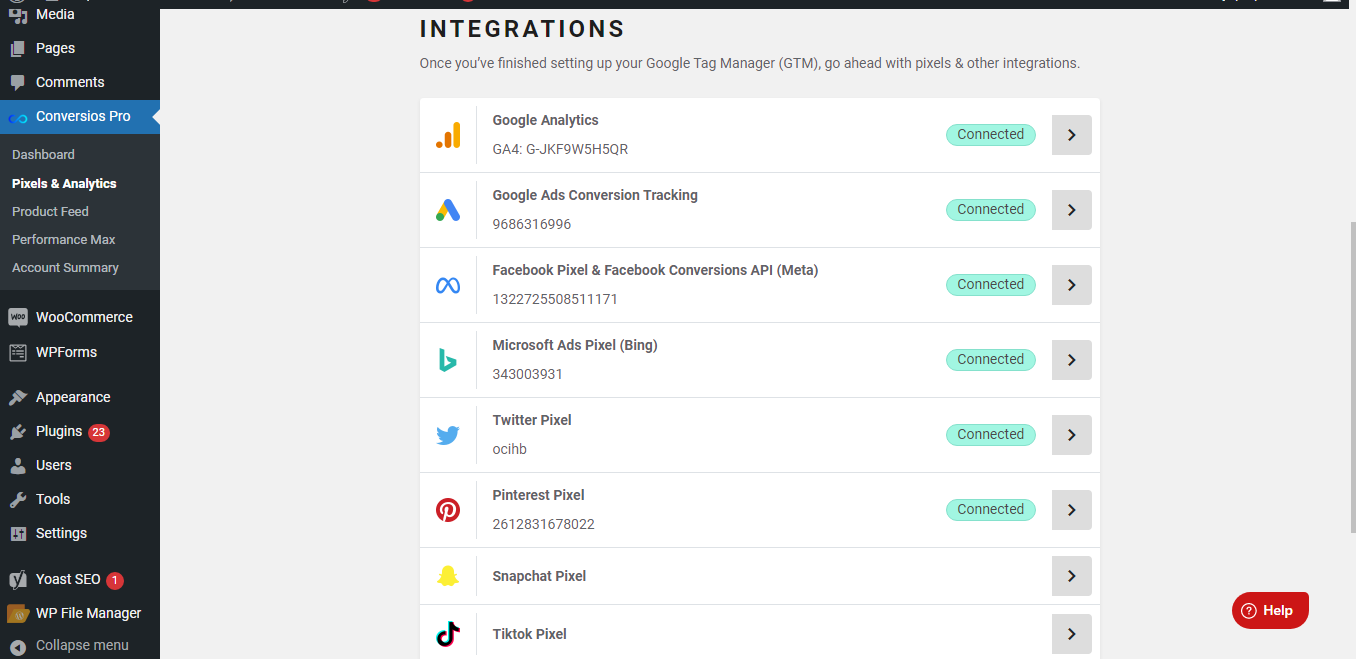
You can view all the pixels' configurations and browse to a specific pixel to add/update the account. 
This is a Google Tag Manager setting page where you can configure your Google Tag Manager container or use Conversion Global Container (default). 
All the 76+ pre built tags, triggers and variable in your GTM account. 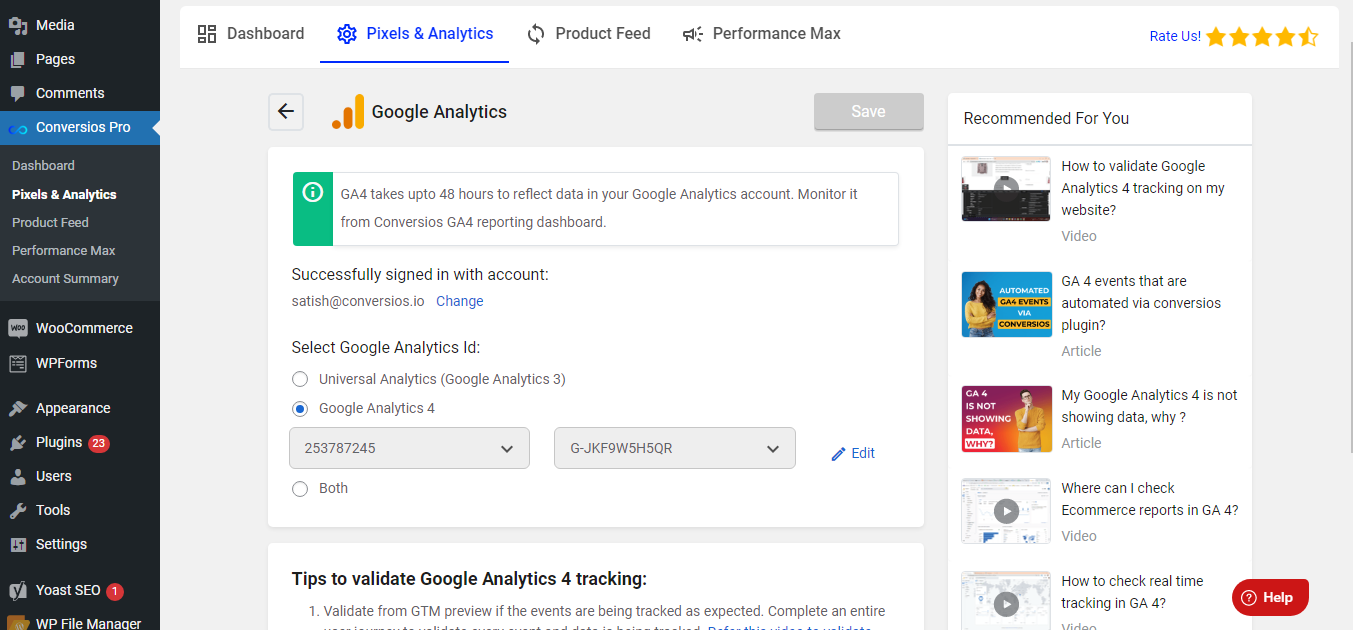
This is a Google Analytics setting page. 
This is a Google Ads settings page where you can configure Google Ads conversion tracking, enhanced conversion tracking & dynamic remarketing tags for ecommerce events. 
This is a Facebook configuration page where you can configure Facebook Pixel and Facebook Conversions API tracking. 
Actionable dashboard which displays the key metrics that help your ecommerce business scale faster. ecommerce conversion and checkout funnel reports that help you to visualize user journeys from the Home page to order confirmation. Product, Source/Medium and Campaign Performance Report where you can see all the respective performances. 
Google Analytics 4 dashboard 1 Once you connect Google Analytics 4 property from the plugin, your WooCommerce store's data will look like this in your Google Analytics 4 dashboard. The plugin captures all the data points related to ecommerce events. 
Google Analytics 4 dashboard 2 Once you connect Google Analytics 4 property from the plugin, your WooCommerce store's data will look like this in your Google Analytics 4 dashboard. The plugin captures all the data points related to ecommerce events. 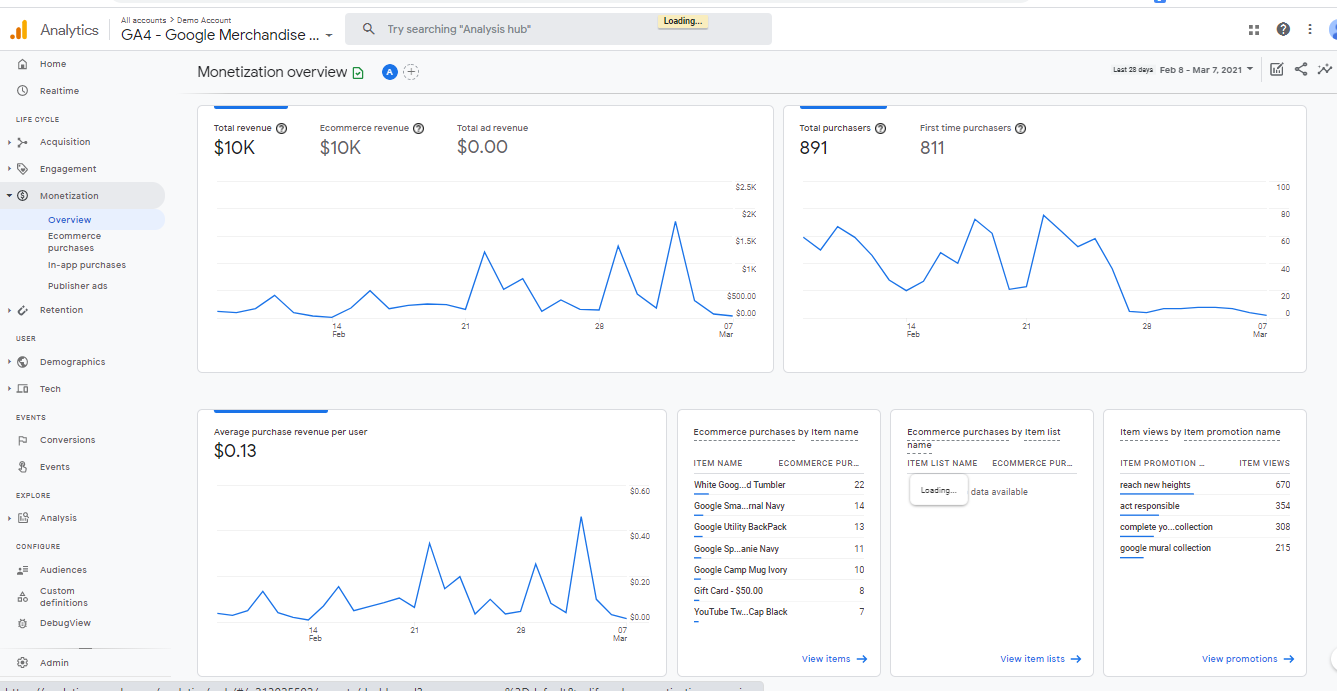
Google Analytics 4--> Monetization 1 Once you connect Google Analytics 4 property from the plugin, your WooCommerce store's data will look like this in your Google Analytics 4 under Monetization --> Overview. The plugin captures all the data points related to ecommerce events. 
Google Analytics 4--> Monetization 2 Once you connect Google Analytics 4 property from the plugin, your WooCommerce store's data will look like this in your Google Analytics 4 under Monetization --> Overview. The plugin captures all the data points related to ecommerce events. 
Google Analytics 4 Monetization --> ecommerce purchases Once you connect Google Analytics 4 property from the plugin, your WooCommerce store's data will look like this in your Google Analytics 4 under Monetization --> ecommerce purchases. The plugin captures all the data points related to ecommerce events. 
Product Feed --> Channel Configuration where you can link your Google Merchant Center Account and TikTok catalog to process Product Feed. 
This is the inner setting page for Google Merchant Center where you can SignIn using Google account and select Google Merchant Center Account to link along with doing Site verification and Domain claim. 
This is the inner setting page for TikTok catalog where you can Sign In using your Tiktok account, select TikTok Business Account and set TikTok catalogs country-wise. 
Product Feed --> Feed Management. This is where you can create and manage feeds. 
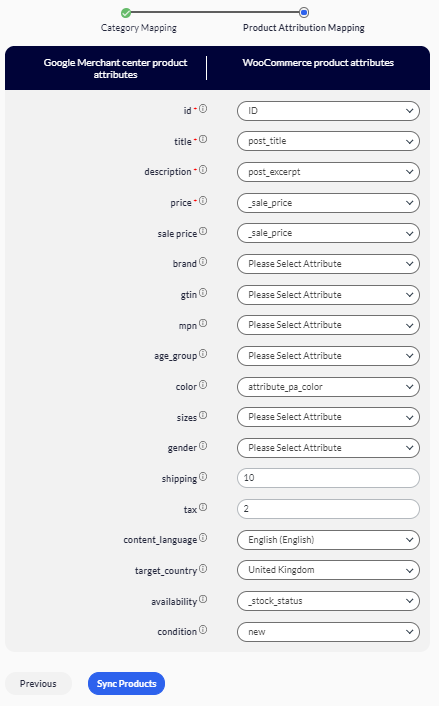
Product Feed --> Channel Configuration --> Attribute and Category mapping. This is where you can map your WooCommerce product attributes and categories to the Conversios product attributes and categories and save them. 

FAQ
-
What does the Conversios WooCommerce plugin do?
-
Automates conversions for Google Analytics 4, Google Ads, Meta( Facebook) Pixel & Conversions API, Snapchat, Pinterest, and TikTok via Google Tag Manager, enhancing WooCommerce store analytics. It also helps in automating products feeds for Google Shopping, Facebook Catalog and Tiktok Catalog along with the campaign management and reporting.
-
What is Conversios for WooCommerce?
-
Conversios is a comprehensive WooCommerce plugin for advanced Google Analytics 4 tracking via Google Tag Manager. It specializes in integrating pixels for Google Ads, Meta (Facebook and Instagram), Snapchat, Pinterest, TikTok, Microsoft Ads, and Twitter, crucial for dynamic audience building and tracking e-commerce sales.
-
How does Conversios personalize WooCommerce customer journeys?
-
By integrating with Google Ads, Meta Pixel, Snapchat Pixel, and others, Conversios personalizes customer journeys in WooCommerce. It provides unified conversion tracking, optimizes Google Ads campaigns using Google Analytics 4 data, and personalizes shopping experiences based on user behavior data.
-
How can the plugin enhance my online store’s performance?
-
Improves tracking accuracy, maximizes ad channel effectiveness, and automates WooCommerce Product Feed to Google Merchant Center and TikTok Catalog.
-
Can I integrate my own Google Tag Manager account with this plugin?
-
Yes, it allows integration and automation of your Google Tag Manager account, especially beneficial for premium WooCommerce stores.
-
Which ad pixels does the plugin support for data layer automation?
-
Supports data layer automation for Google Analytics 4, Google Ads, Facebook Pixel & Conversions API, TikTok, Snapchat, CrazyEggs, Pinterest, HotJar, etc.
-
How does the plugin handle e-commerce event tracking for Google Analytics 4?
-
Offers one-click Google Analytics 4 e-commerce tracking automation, covering events like product listing, clicks, viewed items, add to cart, checkout steps, and purchase.
-
Does the plugin include a Super feed feature for syncing Product Feed?
-
Yes, provides a Super Feed feature for syncing Product Feed with a single click in WooCommerce.
-
Can I sync the Product Feed to Google Merchant Center and TikTok Catalog using this plugin?
-
Yes, it automates Product Feed sync to Google Merchant Center and TikTok Catalog using powerful APIs in one click.
-
How does the plugin ensure GDPR compliance?
-
Adheres to GDPR compliance standards to protect user privacy and data with a Server Side Tagging Solution.
-
Can I use the plugin to create and manage Performance Max campaigns for Google Ads?
-
Yes, allows seamless creation and management of Performance Max campaigns directly from your WooCommerce store.
-
How does the plugin handle server-side tracking for various ad platforms?
-
Supports server-side tracking for GA4, Facebook, Google Ads, Snapchat Conversions API & TikTok Events API.
-
Does the plugin offer reporting and insights for Google Analytics 4 and Google Ads?
-
Yes, provides an insightful and user-friendly reporting dashboard for both Google Analytics 4 and Google Ads in WooCommerce.
-
What legacy reports are available for GA4 data in the plugin?
-
Includes legacy reports such as product performance, order performance, channel performance, e-commerce funnel, and checkout funnel for GA4 data.
-
How does the plugin handle the automation of feed channels for upcoming campaigns?
-
Offers an auto-sync feature to automate feed channels, ensuring your product data is up-to-date for upcoming campaigns in WooCommerce.
-
Can I customize the plugin for specific target countries and campaigns?
-
Yes, allows you to manage feeds for target countries and apply advanced filters to tailor it for specific campaigns in WooCommerce.
-
Is there a limit to the number of products that can be synced using the Product Feed Manager?
-
Supports syncing an unlimited number of products from your WooCommerce store to Google Merchant Center, TikTok Catalog & Facebook Catalogue.
-
How can I receive automated e-commerce reports from GA4 directly into my email inbox?
-
Offers a smart email feature that delivers e-commerce reports from GA4 directly to your email inbox on a daily basis for WooCommerce users.
-
Reach out to support by [insert support contact details here] for any WooCommerce plugin-related queries.
-
Can I manage WooCommerce Product Feed for other ad channels like Facebook, Snapchat, Pinterest, and Microsoft?
-
Plans to support Product Feed for additional channels in upcoming versions for WooCommerce stores.
-
How can I validate Google Analytics 4 tracking on my website?
-
Provides an Event Tracking Wizard to help in real-time validation of tracked events on your WooCommerce website.
-
Can I map WooCommerce product categories and attributes for optimizing campaigns?
-
Yes, allows you to map WooCommerce product categories and attributes for optimizing your campaigns.
-
What is the advantage of using the Auto-sync feature for Product Feed?
-
Automates your feed, keeping your product data up-to-date in the feed channels daily or weekly in WooCommerce.
-
How does the plugin handle error descriptions for disapproved products on Google and TikTok?
-
Provides the approval status along with error descriptions for disapproved products from Google and TikTok.
-
Is there a trial period available for the plugin?
-
No free trial is provided, but there is a 15-day no-question refund policy for the WooCommerce plugin.
-
How to activate my license key?
-
Update to the Pro version in your WordPress backend, use your license key, and click on the arrow mark to activate it for WooCommerce.
-
How to get my invoice for my purchase/renewals with Conversios?
-
Directly download invoices from the Conversios website using your subscription ID for your WooCommerce plugin purchase.
-
Why isn’t my data updating in the GA4 dashboard within the plugin?
-
Data typically takes 24 to 48 hours to sync with Google Analytics 4; this is a common aspect for WooCommerce stores.
-
Why are my Purchase events/Transactions not being tracked in the plugin dashboard and GA4 reports?
-
Ensure your website is validated by placing a test order and using the Event Wizard tracking feature for diagnostics in WooCommerce.
-
I’m unable to complete the plugin setup as it keeps loading. What should I do?
-
Initiate the plugin setup using Chrome, then use any browser to view it for WooCommerce.
-
Why am I seeing an alert when trying to claim my domain through the plugin?
-
This may occur if the domain is already claimed in your Google Merchant Center account. Unclaim it there first for WooCommerce.
-
How long does it take for my products to sync into my Google Merchant account?
-
Allow at least 30 minutes for products to sync with your Merchant Center after using the Conversios plugin in WooCommerce.
-
How to upgrade the plugin to the latest version?
-
Enable auto-updates in your WordPress store for automatic updates or manually download the latest version from [website] for WooCommerce.
Reviews


Contributors & Developers
“Conversios – Google Analytics 4 (GA4), Meta Pixel & more Via Google Tag Manager For WooCommerce” is open source software. The following people have contributed to this plugin.
Contributors

“Conversios – Google Analytics 4 (GA4), Meta Pixel & more Via Google Tag Manager For WooCommerce” has been translated into 2 locales. Thank you to the translators for their contributions.
Interested in development?
Browse the code, check out the SVN repository, or subscribe to the development log by RSS.
Changelog
7.0.8 – 29/03/2024
- Security enhancement.
7.0.0 – 06/02/2024
-
We’re thrilled to announce a significant update, marking one of our major releases this year. This update brings a host of new features and improvements:
- A completely redesigned dashboard to simplify the onboarding process for our users.
- New, user-friendly setup wizards for various functionalities, including 1. Ecommerce and Conversions Tracking, and Audience Building, 2. Product Feed Management for Google Shopping, TikTok, and Facebook, 3. Enhanced Reports and Insights, 4. Campaign Management for Google Shopping.
- Enhanced flexibility in creating product feeds with a variety of inventory selection options.
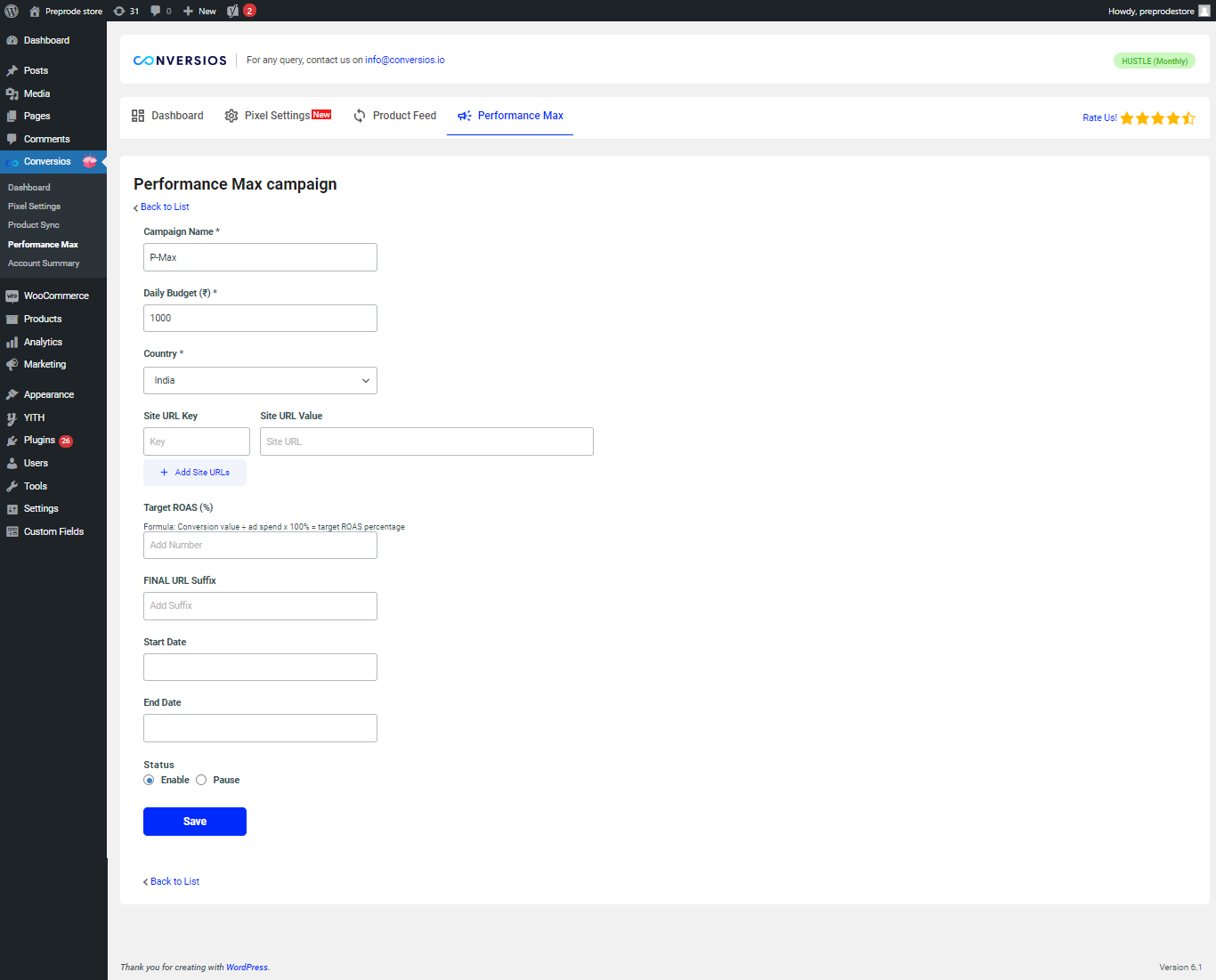
- The ability to launch Performance Max campaigns using your product feeds.
- Options to create campaigns for all WooCommerce products or specific products based on filters.
- Integration of new features like TikTok Events API and Snapchat Conversions API, in addition to existing pixel tracking.
- The introduction of advanced paid plans designed for our pro users.
-
We’re excited for you to explore these new capabilities and look forward to supporting your success with our enhanced platform.
6.9.0 – 27/11/2023
- Run a Performance Max Campaign for the products in the feed
- Manage the existing Performance Max Campaign
6.8.3 – 07/11/2023
- UI chnages for the festive season and minor enhancement.
6.8.1 – 03/11/2023
- Added suggest prompt / feedback form for users in AI sections of Reports & Insights page.
- Updates in GA4 grid report in reporting.
6.8.0 – 31/10/2023
- In this release, we have added tracking for the Hotjar, Microsoft clarity, Crazyegg and conversion tracking for the Bing Ads for the purchase event.
- Added HPOS compatibility to ensure the seamless event tracking with the woocommerce future enhancements.
6.7.0 – 19/10/2023
- In this release, we have limited ecommerce events tracking to page view and purchase events. The other enhanced ecommerce events will be part of our premium plans going forward.
6.6.0 – 18/09/2023
- We have added new feed channel for Tiktok catalog. Users can now sync WooCommerce products into Tiktok catalog to run product ads on Tiktok. Product feed along with the Tiktok pixel and Tiktok events API tracking features will help users scale thier campaigns on Tiktok Ad channel.
6.5.0 – 07/08/2023
- Added Google analytics 4 and Google Ads reports in Ecommerce reports page.
- Added AI powered insights for all google analytics 4 and google ads reports on dashboard and ecommerce reports page.
- Removed Universal analytics / google analytics 3 reports from ecommerce reporting.
- Fixes and Enhancements in Reporting sections.
6.4.0 – 31/07/2023
- AI powered super feed.
6.3.7 – 18/07/2023
- Added WordPress website event tracking.
6.3.6 – 11/07/2023
- Minor bug fix.
6.3.5 – 30/06/2023
- UIUX enhancement in dashboard and GA4 setup screen.
6.3.4 – 28/06/2023
- We have released Server Side Tagging via GTM for GA4, FBCAPI and Google Ads.
6.3.3 – 27/06/2023
- Dashboard UI Enhancements.
- Order performance report for GA4 on Ecommerce reports page.
- Updates in GA4 grid report metrics on Ecommerce reports page.
6.3.2 – 19/06/2023
- Smart email reporting feature.
6.3.0 – 15/06/2023
- Feed Manager – Create edit feeds.
- Advanced Filters.
- Multi-select feature for products.
- Separate Product attributes mapping.
- Delete products from the GMC feature.
- Minor bug fixes.
6.2.2 – 07/06/2023
- In this release, we have resolved UI bugs related to Ecommerce Reports page.
- UI enhancements for GA4 settings page.
6.2.1 – 02/06/2023
- Performance enhancements.
6.2.0 – 31/05/2023
- We have rolled out new improved dashboard that will enable the easy setup of the plugin and it will give you a snapshot of the ecommerce store performance.
- We have rolled out new Ecommerce Reports feature that will give you insights from your Google Analytics and Google Ads data.
- We have optimized the performance of Pixels and Analytics feature.
- We have rolled out User Experience enhancements.
6.1.0 – 15/05/2023
- In this release, we have optimized the user experience of Pixels and Analytics.
- We have added tutorials for all the integrations and informative guides.
6.0.1 – 26/04/2023
- Added compatibility with SEO Yoast plugin with variation product type.
- Enhancements in product syc process in google merchant center.
- Few fixes and enhancements in plugin files.
6.0.0 – 22/03/2023
- Performance enhancements and removed pro feature
5.3.1 – 20/02/2023
- Performance enhancement in datalayer formation for Pixels tracking. Removed address fields from the datalayers except for the purchase event that is used for google ads enhanced conversion tracking.
- Compatibility with Single Variation WooCommerce plugin for product feed creation so it sends product link for variable products automatically.
- Added Conversion analytics badge for front end and the capabilities to turn that off from the settings.
5.3.0 – 16/02/2023
- In this release, we have added flexibility to select events for tracking as per your requirements. You can select the events that you want to track from Pixel settings page. (Only for PRO users)
- Now you can also select user role for which you want to disable the tracking from pixel settings page.
- We have support widget on the plugin screens so that you can reach out to us easily for any queries.
- Minor enhancement for the product sync.
5.2.6 – 02/02/2023
- We have fixed some issues in Google Analytics reporting dashboard and Google Ads conversion label list in pixel settings screen.
- Also, we have added form validations in user onboarding and pixel settings screens.
5.2.5 – 24/01/2023
- Performance Optimization in product sync process for Google merchant center.
5.2.4 – 19/01/2023
- In this release, we have done UI enhancements for our plugin users in the configuration page, while also adding site verification and domain claim status now at all level checkpoints.
- Conversios all in one plugin is also optimized to improve other plugins adaptability and security for our WordPress all in one plugin.
5.2.3 – 12/01/2023
- In this release, we’ve introduced a new setting for Google Ads Conversion Id and Label in the pixel settings. Now you can accurately track your conversions and optimize your Google ads campaigns.
- Minor fixes in Performance Max campaigns screen.
5.2.2 – 04/01/2023
- In this release, we have made fixes in Advance Google Ads settings under the pixel settings tab to align few outliners.
5.2.1 – 02/01/2023
- Minor bugs fixes and improvements.
5.2.0 – 27/12/2022
- We have tinkered one the biggest asked in this release, which is to implement Facebook Conversion API. You can now submit significant events, like purchases or leads, to Facebook Ads by utilizing the Conversios API (FB CAPI) plugin. Better Facebook ad optimization and control over what data is being sent is now made possible via Conversios one single plugin.
- With the above major inclusion of Facebook CAPI, we have also fixed a few minor dashboard and on-boarding problems (UI fixes) and Feature improvements for the product sync.
5.1.2 – 14/12/2022
In this release we have improved user onboarding adjustments, which will give users more control over their decisions, and we have also resolved a dashboard decimal point issue in the Product Performance Report.
5.1.1 – 05/12/2022
- For a quicker and better user experience, we have improved the pixel settings in this release, giving you the option to add and update your Google ads conversion label.
- Minor bug fixes and improvements to the auto product sync feature are also included.
5.1.0 – 24/11/2022
- The new release contains easy-to-implement updates to better adapt our Google Tag Manager capabilities, including the ability to deploy custom GTM features. For a hassle-free deployment of dynamic remarketing and conversion tags, we have also incorporated all pixels (Google ads, Facebook ads, Microsoft ads, Twitter ads, Pinterest ads, Snapchat ads, and Tiktok ads) option in onboarding.
- We have added the how-to guides for pixel implementation.
- Also, now Conversios eCommerce tracking is compatible with “YITH Multi Currency Switcher for WooCommerce” and “YITH Custom Thank You Page for WooCommerce” plugins.
5.0.6 – 18/11/2022
- In this release, we have modified the item data parameters for remarketing and Dynamic Remarketing events, to adapt the new changes at Google Ads guidelines. This upgrade will facilitate the adoption of the new Google Ads standards and improvements for remarketing.
5.0.5 – 15/11/2022
- In this release, we have resolved Average order value UI issue in dashboard.
5.0.4 – 11/11/2022
- We have changed the UI for the menu section.
5.0.3 – 09/11/2022
- Fix: Minor bugs fixes.
5.0.2 – 09/11/2022
- We have made UI changes to the pixel manager feature and we have updated the domain based pricing plans in UI.
5.0.1 – 21/10/2022
- We have done minor UI changes in the new pixel settings screen.
- Also, we have added user guide on how to use your own Google Tag Manager account using the plugin.
5.0.0 – 20/10/2022
- Conversios is geared up for this festive season and with that Conversios is coming up with an array of much demanded features for its users.
- Conversios is the best plugin available in the market for Google Analytics tracking for WooCommerce stores. It is for sure the fastest and the most efficient (95% accuracy guaranteed) plugin for data collection in Google Analytics and GA4.
- At Conversios, we thrive to be your one stop solution for all the MarTech needs and keeping that in focus, we are bringing up 2 major feature updates that many of you were demanding for a while.
- What are we bringing for you?
Google Tag Manager based single click implementation for Google Analytics, Google Analytics 4, and multiple ad pixel integrations like Meta, Snapchat, Tiktok, Pinterest, Google Ads, Twitter, Microsoft Bing Ads
Use your own Google Tag Manager account with the conversios plugin. - What will you get out of it?
- Google Tag Manager based implementation helps in data collection accuracy and you have more control over your tags implemented on the website.
- Many website’s page speed decreases because of gtag.js implementation as it renders multiple Javascripts on the website. Google Tag Manager based implementation uses datalayer to push data to GA or other ad channels and it renders only once on your web page. Hence, your site speed will be intact with this approach.
- Debugging which events are tracking correctly or not becomes a lot easier in Google Tag Manager based implementation. Hence, less possibility of data leakage from your web store and more insights from the visitors.
- Google Tag Manager based implementation will prepare you for the next privacy-centric industry revolution leveraging first party cookies. Sooner or later stores like yours will have to go for server side tagging. GTM based implementation is our first step for you in that direction.
- If you want us to add any other pixel in the plugin, shout out and that will be done in 3 business days.
4.9.4 – 06/10/2022
- Enhancement: Latest optimization will create smooth on-boarding for new and returning users, decreasing the page load time for configuration of Google analytics, Google Ads and GMC accounts.
- We also changed our Conversios GA and Google Shopping Plugin Menu structure for better flow and easy naming convention.
4.9.3 – 27/09/2022
- Changed the text domain for internationalization and making it compatible with other locales.
4.9.2 – 16/09/2022
- In our latest release we have fixed the issues of product attribute mapping with SKU, GTIN and MPIN for variable products.
4.9.1 – 15/09/2022
- Improvements and product optimization of auto scheduler for product sync. Users with sizable products will now have good time while running scheduler.
4.9.0 – 08/09/2022
- The implemented feature will give Conversios users, the capability to customize “Google Analytics Event tracking” for their custom implementations on the WooCommerce store pages, which will help them not lose tracking on page events.
4.8.9 – 29/08/2022
Bug to “remove from cart” has been resolved when user updates product quantity in your woo-commerce store. We have also made some UI changes for easy transition and customer help.
4.8.8 – 22/08/2022
For ease of onboarding and better user understanding, we have enhanced our UI and content. Also we have fixed some minor issues wrt to the enhanced Conversion Tracking.
4.8.7 – 09/08/2022
- Long awaited product sync feature is out for our Pro users. Now you can manage your product sync duration and product batch size on your own at your convenience.
4.8.6 – 04/08/2022
- Fix: Minor bugs fixes.
4.8.5 – 03/08/2022
- Performance optimization and improvements for Google Ads enhanced conversions tracking and Google Aanalytics 4 dashboard loading issue to some users.
- Network site compatibility enabled.
4.8.4 – 21/07/2022
- Fix: Code optimization in terms of Google Ads Conversion Tracking.
4.8.3 – 18/07/2022
- New Feature (PRO) – Improve accuracy of ads Conversion Tracking by enabling Google Ads enhanced conversions. Users can also select the conversion label for specific Conversion Tracking (if any) in Google Ads.
4.8.2 – 12/07/2022
- NEW: (PRO) You can also track your order refund in Google Analytics GA4 and GA3.
4.8.1 – 21/06/2022
- Fix: In this release, optimzation of code in terms of Pmax Campaign.
4.8.0 – 20/06/2022
- New:- Add the New Feature “Performance Max Campaigns” so From the plugin itself users can create a Pmax campaign within a few clicks to promote products across Google Search, Shopping, YouTube, Gmail, and the Display Network. He can also check the Campaign-wise performance report which gives visibility of Clicks, Cost, Conversion, and Sales of respective Campaigns.
4.7.5 – 07/06/2022
- NEW: (PRO) Add the New features “Content Grouping” for Google Analytics tracking & “Google Optimize tracking”.
4.7.4 – 01/06/2022
- Code optimization in terms of backend load time, onboarding spin wheel load time.
4.7.3 – 12/05/2022
- Update: Google Ads API Libraries
- Fix: Fetch GA4 measurement id list on the onboarding page, the issue for some users.
- Fix: GA4 tracking – Checkout steps issue has been fixed.
4.7.2 – 21/04/2022
- Tweak: Now, Customer can choose the tracking trigger for addTocart (product detail), checkout steps and thankyou page.
- New: (PRO) Now compatible with WooCommerce custom attribute mapping for the brands (product) in the product sync.
4.7.1 – 13/04/2022
- New: (PRO) Product sync feature now compatible with various Brand plugins like Perfect Brands for WooCommerce, YITH WooCommerce Brands️ and WooCommerce Brands.
4.7.0 – 05/04/2022
- New: Facebook Pixel Conversion Tracking for major ecommerce events like Page view, Add to Cart, Initiate checkout, Purchase, View Content and Search events.
- New: Compatible with Multi Currency plugins like “WOOCS”, “CURCY – Multi-Currency for WooCommerce” and “WBW Currency Switcher for WooCommerce”
4.6.9 – 21/03/2022
- Fix: – Site verification issue for some users.
4.6.8 – 17/03/2022
- New: In this release, we have add GA4 dashboard with important e-commerce reports.
4.6.7 – 11/03/2022
- Fix: – Fixed the Google Ads converstion tracking issue for some users.
4.6.6 – 03/03/2022
- New: In this release, we have enhanced and optimized in Google Analytics tracking event.
- Tweak: Now, the admin user will be able to change the thank you page Conversion Tracking method while setting up the plugin under Google Analytics tab.
- Tweak: Plugin will no longer be supported for the WooCommerce versions anything less than 2.8
4.6.5 – 16/02/2022
- Fix – Fixed :- Onboarding loading issue for some users.
4.6.4 – 12/02/2022
- New: With our New Feedback feature on Dashboard ,user can now share the feedback about the plugin
- Tweak: We enhance the Product Sync feature wher user can choose the batch size for product sync
- Fix -We fixed the import products from GMC
4.6.0 – 26/01/2022
- In this release, bug fixed and performance improvement.
- We have fixed the onboarding issue which was raised by some users.
4.5.9 – 17/01/2022
- In this release we updated the Google Ads reports like Campaign performance, Smart Shopping and Product Performance & Product Partition.
4.5.1 – 10/12/2021
-
Plugin has enhanced the feature “Product Sync Compatibility” with the”YITH WooCommerce Brands Add-On”.
-
Custom atributes read from JSON file issue got fixed.
-
Improvements in product feed sync feature.
4.4.1 – 15/11/2021
- Earlier, agency owners having multiple Google Analytics accounts associated with a single email id used to face issues in loading all the Google Analytics accounts on the onboarding screen. We have added load more capability in order to provide smooth user experience
4.4.0 – 01/11/2021
- In this release, we have added product type and custom attributes for the product sync capability which will help in enhancing your product feeds in Google Merchant Center. These attributed will automatically collected and pushed to GMC when you are syncing products.
4.3.4 – 21/10/2021
- Site verification and domainc claim issue got fixed for the manually created merchant center accounts
- Some users were facing difficulty on the onboarding page because of the access token expiry. The issue is fixed now.
4.3.1 – 08/10/2021
-
Pricing plans are updated in the UI
-
Performance enhancement for dashboard API
4.3.0 – 29/09/2021
-
We have added Campaign performance data in the dashboard. This will allow you to have visibility on your Google Ads campaigns. It will show you clicks, cost, conversions, and sales like important metric for each campaign so that you can take informed decisions to increase your marketing ROI.
-
Enhanced Google authentication flow in order to manage expiry of tokens.
-
Resolved some bugs on the onboarding page for better performance
4.2.1 – 21/09/2021
-
Enhancements on reporting dashboard
-
Some users were facing issue with regarding tvc_lc
-
client_id issue is fixed now
4.2.0 – 20/09/2021
-
In this release, we have rolled out the most demanded feature by you all – Reporting dashboard. Reporting dashboard will showcase all the important e-commerce KPI reports in the plugin’s UI.
-
Plugin UI enhancements
-
Performance enhancements and bug fixes
4.1.3 – 06/09/2021
- Domain claim notice issue is resolved
4.1.2 – 02/09/2021
-
For some users, products were not auto-updated in the merchant center. The issue is fixed now and the free plugin will update the products in the merchant center at every 25 days interval.
-
We have now removed the onboarding sub-menu from WordPress dashboard section.
-
There was a discrepancy in the product data that was being shown to Product sync dashboard, it is now fixed.
-
Admin notice was not getting permanently closed for some users, we have fixed the issue now.
-
Performance enhancements for product sync functionality for Google Shopping.
4.1.1 – 24/08/2021
- Fixed the issue for fetching Google Ads account for some store
- Fixed WordPress backend stying bug
4.1.0 – 24/08/2021
- Now, users can configure their Google accounts without leaving the WordPress interface. We have made plugin set up flow as seamless as possible.
4.0.1 – 06/08/2021
- We have fixed Google Ads Conversion Tracking issue (Pro)
4.0.0 – 29/07/2021
-
Over the years, our team has worked tremendously hard in delivering the best possible version of the plugin delivered to you.
We’ve traded a ton of ideas, feedback and suggestions from all of you who’ve been using this plug-in.
It has given us a positive vote of confidence.
We’re now taking a giant leap forward, by launching Conversios.
With Conversios, we want to create an ecosystem of plugins that arm you with every analytical eye you need to make your business successful.
Every ka-ching you get, adds to our reason to exist.
We’re entrepreneurs just like you. The roads been full of ebbs and flows, and it always will be.
With Conversios, we just wish to make it smoother for you.
Do take a look and share your feedback & suggestions with us!-
We have introduced first month free trial for all our pro plans. You can try out any of the pro plan free for month.
-
Major enhancements and improvements for product feed sync feature. Now, you will be able to sync unlimited products seamlessly.
-
Google Analytics tracking optimization – we have optimized the javascript code that will result in faster loading of your websites.
-
Dynamic Remarketing feature enhancement
-
Added advanced trackings for more enhanced data that can be used to better understand user journey and will help you in better retarget and improve the conversion %. (Pro)
-
Added one click plugin upgrade feature, user can now enter the license key from the plugin settings to active the pro plan.
-
Added account summary page
-
Optimized and migrated to latest Google Ads API for better and enhanced performance
-
UI bug of Shopping campaign cost is fixed.
-
3.1.0 – 15/06/2021
- Enhanced user experience with new UI
- Earlier some users were able to see 25 products only on product sync dashboard, the issue is fixed now
- Added customized notifications to track the activty and functioning of plugin
- Added customer support number to quickly reach out to us for any query
- API performance enhancements
3.0.5 – 12/04/2021
- Add auto product sync feature enhancement – In the background, every month runs a process to sync the product, Run only those products who are completed the manual product sync.
3.0.4 – 31/03/2021
- UI bug issue solved
- Fix to dismiss the admin notices permanentaly
3.0.3 – 30/03/2021
- Added double check for auto site verification for merchant center accounts
- Added double check for auto domain claim for merchant center accounts
- Bug fix for HTTP_HOST php warning raised by some clients
- User friendly feature notifications
- Removal of Brand, GTIN and MPN custom product meta fields addition from the plugin
3.0.2 – 17/03/2021
- Product sync feature enhancement – Users can now map upto 25 product attributes which will help them opt for enhanced listing in Google search/Shopping
- Auto check on the attributes like id, product title, product description, product link, image link, offer id, price, target country, content language, Google Merchant Center category, sale price, availability, color, size, item_group_id. User does not need to worry about these attributes, the plugin will manage it in the back end when you opt for product syncing
- Variable products are fully supported for 4 attributes – color, size, gender, age group.
- Auto fetch of variable products data while syncing products into merchant center account
- In case the domain claim fails, user can now manually claim website from plugin’s interface by visiting Google Shopping tab
- Some users raised a undefined index notice in version 3.0.1 that is resolved in this version.
3.0.1 – 12/03/2021
- Bug fixes
- Performance improvement
- Site speed issue got resolved.
3.0 – 08/03/2021
- We have been working on this release for the last few months and we are happy to announce the release of highly demanded features by you. The major features include stand alone GA 4 tracking, automation of Dynamic Remarketing tags for ecommerce events and complete Google Shopping solution.
- With this release users will be able to do stand alone Google Analytics 4 tracking for ecommerce events
- ecommerce businesses can now select both universal analytics and Google Analytics 4 properties for ecommerce tracking
- Users can now enable Google Ads remarketing tags on all pages
- User can opt for Dynamic Remarketing tags automation for all major ecommerce events like view_item_list, view_item, add_to_cart, purchase
- We are introducing complete Google Shopping solution that includes Google Merchant Center account management, Google Ads account linking with Google Merchant Center, seamless product sync from WooCommerce store to Google Merchant Center account, smart shopping campaign creation and management, smart shopping campaign reports so that ecommerce businesses can reach millions of shoppers across Google.
- The Google Shopping solution is complemented with Dynamic Remarketing tags for ecommerce businesses, so you can instantly start running smart shopping campaigns to re target the users based on the past site behavior
- Automatically verifies site and claims domain for Merchant center approval
- Seamless product sync from WooCommerce store to Google Merchant Center and Opt your product data into programmes, like surfaces across Google (Free listing for Shopping tab under Google Search), Shopping ads, local inventory ads and Shopping Actions, to highlight your products to shoppers across Google.
- Create a new Google Ads account using this plugin and get free coupon on the spends you do for first 31 days (Coupon amount depends on the country from which you are creating the Google Ads account)
- Compatibility with WooCommerce 5.0.0
1.0.10 – 26/09/2014
- Allows user to set local currency
- Captures Impressions, Product Clicks and Add to Cart on Featured Product section and Recent Product section on Homepage
- Captures Impressions, Product Clicks and Add to Cart on Related Product section on Product Page